

Introduction
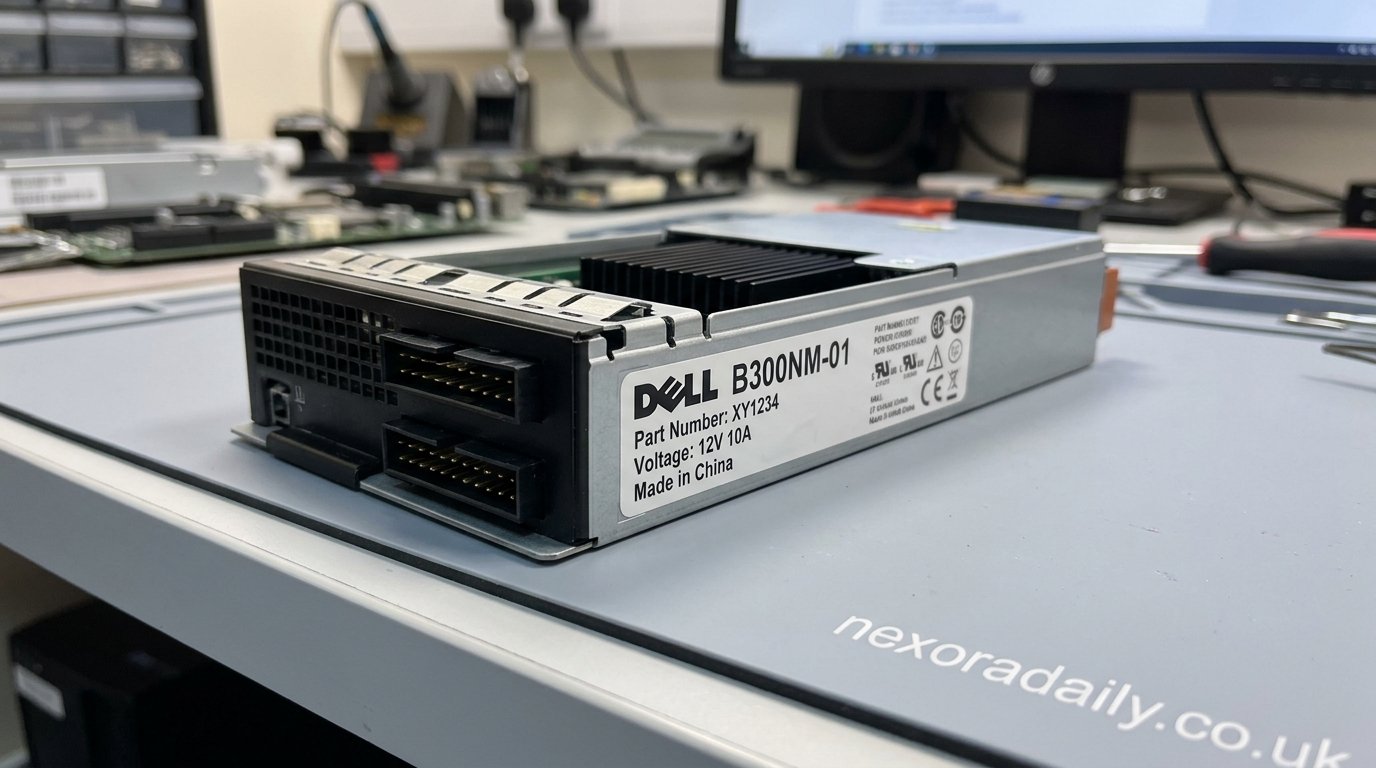
The Dell B300NM-01 is a 300-watt power supply unit (PSU) designed for use in several Dell desktop computers, particularly within the Inspiron and Vostro product lines. Although power supplies are often overlooked when discussing computer hardware, they are among the most critical components inside any system. A reliable PSU ensures that every internal component receives stable and efficient power, allowing the computer to operate smoothly and safely.
Many Dell desktop systems manufactured during the mid-2010s continue to be used in homes, offices, schools, and small businesses. As these computers age, one of the most commonly replaced components is the power supply. The Dell B300NM-01 remains a popular replacement option because it was engineered specifically for Dell systems and provides dependable performance for everyday computing tasks. Understanding its specifications, compatibility, functionality, and maintenance requirements can help users make informed decisions when repairing or upgrading their computers.
Understanding the Dell B300NM-01 Power Supply
A power supply unit serves as the heart of a desktop computer’s electrical system. It converts alternating current (AC) electricity from a wall outlet into direct current (DC) power that can be used by the motherboard, processor, storage devices, memory modules, cooling fans, and other hardware components. Without a functioning PSU, no part of the computer can operate correctly.
The Dell B300NM-01 was developed to meet the power requirements of specific Dell desktop models. Unlike generic power supplies, this unit was manufactured with Dell’s system architecture in mind. Its connector arrangement, physical dimensions, and power distribution characteristics are optimized for compatible Dell systems. This customized design helps ensure stability, efficiency, and reliable operation throughout the life of the computer.
Because Dell often uses proprietary hardware configurations, replacing a failed PSU with the exact model or an approved compatible version is usually recommended. The B300NM-01 was built to deliver consistent voltage levels under normal workloads, making it well-suited for office productivity, educational applications, web browsing, and general home computing.
Technical Specifications and Design Features
The most notable specification of the Dell B300NM-01 is its 300-watt power output. This wattage level is sufficient for systems equipped with integrated graphics, standard storage drives, optical drives, and mainstream processors. The power supply was never intended to support high-end gaming hardware or power-hungry workstation components, but it performs exceptionally well within its intended operating range.
The unit supports standard electrical input requirements found in most regions around the world. Depending on the manufacturing revision, it can operate with various voltage ranges and frequencies, allowing it to function in different electrical environments. Internal voltage regulation circuits help maintain stable power delivery even when system workloads fluctuate.
Cooling is another important aspect of the design. The B300NM-01 includes an integrated cooling fan that helps dissipate heat generated during operation. Effective thermal management is essential because excessive heat can reduce component lifespan and impact overall reliability. The PSU’s ventilation design works alongside the computer’s airflow system to maintain safe operating temperatures during extended use.
Compatible Dell Desktop Systems
One of the primary reasons users search for the Dell B300NM-01 is to replace a failed power supply in an existing Dell desktop. The unit is most commonly associated with the Dell Inspiron 3847, a desktop system that gained popularity among home users and small businesses due to its affordability and reliability.
In addition to the Inspiron 3847, the power supply is frequently linked to other Dell desktop families, including selected Inspiron and Vostro models. However, compatibility should never be assumed based solely on computer series names. Dell often releases multiple hardware revisions within the same product family, and power supply connectors may vary between models.
Before purchasing a replacement, users should compare the part number printed on the original PSU with the replacement unit. Connector types, motherboard compatibility, and mounting arrangements should also be verified. Taking these precautions helps prevent installation issues and ensures that the replacement power supply functions correctly after installation.
The Importance of a Reliable Power Supply
Many computer users focus primarily on processors, memory, graphics cards, and storage devices when evaluating system performance. However, a power supply has a direct impact on the stability and longevity of every component inside the computer. Even the most powerful hardware can become unreliable if it receives inconsistent electrical power.
The Dell B300NM-01 was designed to provide stable voltage outputs across multiple power rails. This stability helps protect sensitive electronic components from electrical fluctuations that could cause crashes, data corruption, or hardware damage. Consistent power delivery is especially important during startup sequences when system components require a sudden increase in electrical current.
A quality power supply also contributes to system efficiency. By converting electrical energy effectively and minimizing unnecessary power loss, the PSU helps reduce heat generation and supports long-term reliability. These characteristics have contributed to the reputation of the Dell B300NM-01 as a dependable replacement component for aging Dell desktops.
Common Problems and Failure Symptoms
Like all electronic devices, power supplies eventually experience wear and degradation. Internal capacitors, cooling fans, and voltage regulation components can deteriorate over time, especially after years of continuous operation. Understanding the warning signs of PSU failure can help users address problems before they lead to complete system downtime.
One of the most common symptoms is unexpected shutdowns. A computer may suddenly power off without warning, particularly when running demanding applications. Random restarts, freezing during boot-up, and intermittent startup failures can also indicate that the power supply is struggling to deliver stable power.
In more advanced stages of failure, the system may fail to power on entirely. Users may hear unusual buzzing noises, detect overheating, or notice a burning smell coming from the rear of the computer case. While these symptoms do not always guarantee that the PSU is faulty, they often warrant immediate inspection and testing to prevent potential damage to other hardware components.
Performance in Everyday Computing Environments
The Dell B300NM-01 was developed for mainstream desktop computing rather than enthusiast-level performance. Within that intended role, it delivers reliable operation and sufficient power for typical daily workloads. Users performing office tasks, online research, document editing, video conferencing, email communication, and multimedia playback generally remain well within the power supply’s operating capacity.
Many older Dell desktops equipped with the B300NM-01 continue to function effectively in educational institutions and business environments. These systems often run productivity software, accounting applications, web-based services, and administrative tools without requiring significant power resources. As a result, the 300-watt capacity remains adequate for a large number of practical use cases.
Another advantage is operational consistency. When properly maintained, the PSU can provide years of dependable service. This long-term reliability is one reason many organizations choose replacement power supplies rather than retiring otherwise functional desktop systems.
Replacing and Installing a Dell B300NM-01
Replacing a power supply may appear intimidating to inexperienced users, but it is often one of the more straightforward desktop repair procedures. The process generally involves disconnecting the old PSU, removing mounting screws, installing the replacement unit, and reconnecting the necessary power cables to the motherboard and storage devices.
The most important factor during replacement is compatibility. While some standard ATX power supplies may physically fit inside a Dell chassis, connector layouts and cable lengths may not always match system requirements. Installing an incompatible PSU can create operational issues or prevent the computer from starting altogether.
When selecting a replacement B300NM-01, users should prioritize tested and verified units from reputable suppliers. Refurbished original Dell power supplies are commonly available and often undergo electrical testing before resale. Choosing a high-quality replacement helps ensure reliable performance and reduces the likelihood of future failures.
Maintenance and Lifespan Considerations
Proper maintenance can significantly extend the lifespan of the Dell B300NM-01. Dust accumulation is one of the most common threats to power supply longevity. As dust collects inside the PSU and surrounding components, airflow becomes restricted, causing temperatures to rise and increasing stress on internal circuitry.
Routine cleaning of computer vents, fans, and internal components can improve cooling efficiency and reduce thermal strain. Users should also ensure that the computer is placed in a well-ventilated environment where air can circulate freely around the chassis. Excessive heat remains one of the leading causes of premature hardware failure.
Electrical protection is equally important. Using a surge protector can help safeguard the power supply against voltage spikes caused by power outages, lightning events, or electrical disturbances. Stable operating conditions contribute greatly to long-term reliability and can help maximize the useful life of the PSU.
Availability and Market Demand
Despite being associated with older desktop systems, the Dell B300NM-01 continues to maintain strong demand in the replacement parts market. Many organizations and individual users prefer repairing existing systems rather than purchasing entirely new computers, particularly when the machine still meets their computing requirements.
The growing interest in sustainable technology practices has also contributed to the continued relevance of replacement components. Extending the lifespan of desktop computers reduces electronic waste and lowers the environmental impact associated with manufacturing new hardware. Replacing a failed PSU is often one of the most cost-effective methods of restoring system functionality.
As a result, the B300NM-01 remains widely available through computer hardware suppliers, refurbishment companies, and specialized replacement part vendors. Availability of both original and compatible units ensures that users can continue maintaining older Dell desktops for years to come.
How the Dell B300NM-01 Fits into Modern Computing
Although modern desktop computers often utilize higher-capacity power supplies with advanced efficiency certifications, the Dell B300NM-01 continues to serve an important role. Not every computer user requires cutting-edge hardware or high-performance gaming capabilities. Many systems are still used primarily for productivity, communication, learning, and routine administrative tasks.
For these applications, the B300NM-01 provides sufficient power while maintaining reliability and compatibility with existing Dell hardware. Businesses with large fleets of aging desktops can often extend operational life significantly through strategic component replacements rather than full system upgrades. This approach reduces costs while preserving productivity.
The continued demand for replacement units demonstrates that dependable hardware remains valuable even as technology evolves. The B300NM-01 represents a practical example of how well-designed components can continue serving users long after their original release.
Conclusion
The Dell B300NM-01 is far more than just a replacement power supply. It is a critical component that enables countless Dell desktop computers to continue operating efficiently and reliably. Designed specifically for selected Dell Inspiron and Vostro systems, the 300-watt PSU delivers stable power, dependable performance, and long-term durability for everyday computing environments.
Whether users are repairing an older Inspiron desktop, maintaining office workstations, or extending the lifespan of a home computer, understanding the capabilities of the Dell B300NM-01 is essential. Its proven reliability, broad availability, and compatibility with numerous Dell systems make it a valuable component in the desktop hardware ecosystem. By choosing the correct replacement unit and following proper maintenance practices, users can continue benefiting from their Dell computers for many years while avoiding unnecessary replacement costs and reducing electronic waste.
